Find the workflow slowing down your field operation.
Crude HR helps service companies fix the paper tickets, approval stalls, onboarding gaps, and spreadsheet handoffs that delay billing, leave revenue unbilled, and keep crews waiting.
15 minutes. One process. A clear next step. No slide deck, no lengthy questionnaire, and no pressure to buy a build.
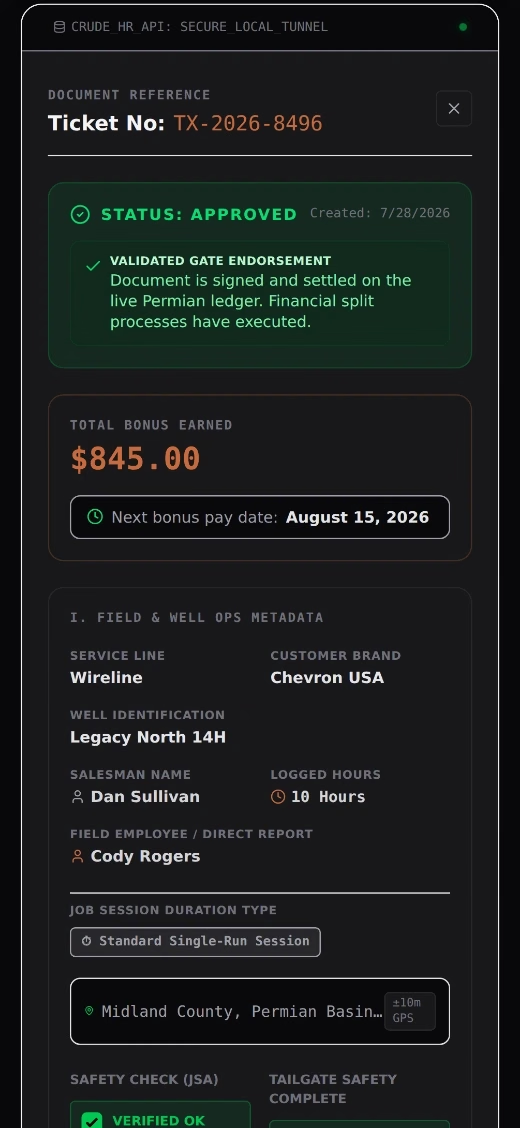
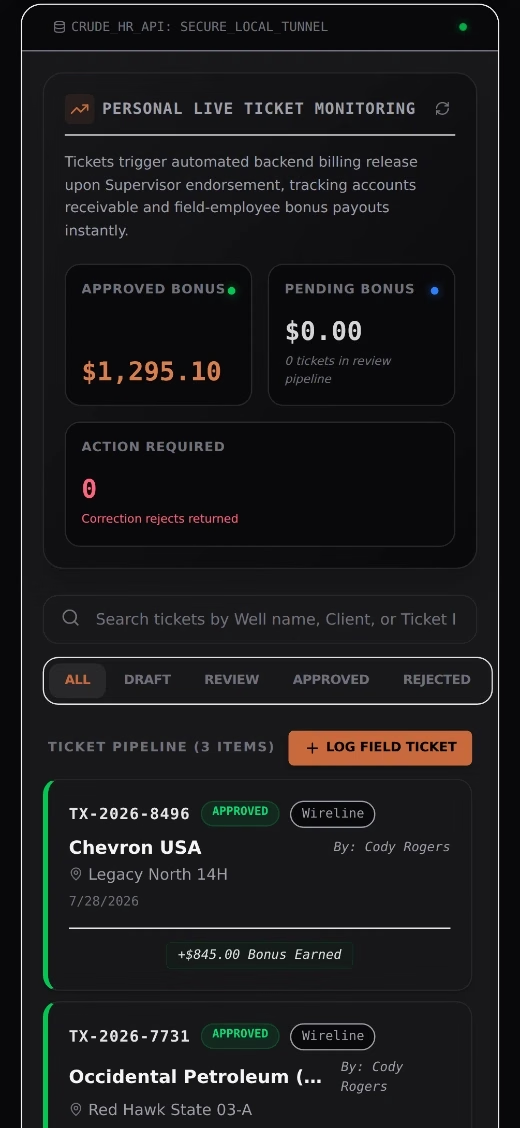
One approved record can move from the wellsite to billing the same day.
The field did the work. The back office is where it gets stuck.
Signed tickets sit in trucks, email, or a supervisor’s desk.
Billing starts days late and office staff re-key the same information.
Review my ticket processStandby, pass-throughs, and rate changes are handwritten or buried in notes.
Work gets underbilled, revenue leaks, and customers receive awkward rebills.
Find my revenue leaksApprovals wait on one hard-to-reach person.
Payroll corrections, delayed invoices, and no accountability trail.
Review my approval flowNew hands or returning crews wait on forms, certifications, or clearance steps.
Idle payroll, gate turn-aways, and dispatch friction.
Review crew readinessHR, payroll, and compliance live in disconnected spreadsheets.
Every month turns into a manual reconstruction.
Review my HR operationsYou do not need a new platform for every problem. First, map the work, remove the waste, then automate the steps worth keeping.
Start small. Get clear. Decide with real information.
Free Workflow Review
We discuss one process, identify the likely bottleneck, and decide whether it is worth a deeper look.
Process Audit, if it is a fit
We map the work end to end, quantify breakpoints, and prioritize the highest-value fixes.
Fixed-scope implementation
Crude HR builds or automates the selected workflow around your actual field, office, payroll, and billing requirements.
The free review is not a disguised technical workshop. You leave with a clear fit/no-fit decision; detailed mapping, ROI analysis, and build design belong in the paid audit. Full detail is on the Pricing page.
Five outcomes worth 15 minutes of your day
Pick the one that costs you the most right now. That is the process we look at first.
The right solution may be a cleaner process, Microsoft 365 tools you already own, a focused workflow automation, a custom internal app, or fractional HR leadership. We recommend the smallest practical fix first.
Built by someone who has had to make the back office keep up with the field.
I am Brittany Sutton. For more than 15 years, I have led HR and back-office operations inside oilfield services, transportation, and manufacturing businesses. I understand the work behind payroll, onboarding, employee records, compliance, approvals, and field paperwork because I have been accountable for it, not because I read a software playbook.
“The old systems of paper were scrapped, and Brittany had the entire set of historical records, totaling tens of thousands, and the entire department converted to electronic documents within weeks.”
What one broken handoff can cost a field-service business
These are anonymized field scenarios and professional-experience examples, not invented client testimonials. Each shows how a paper, approval, billing, onboarding, or compliance breakdown turns into a real operational cost.
One paper ticket held $42,821.80 hostage for 11 days. Here's what it cost, and how digital field tickets fix it.
A forensic breakdown of a real oilfield services field ticket, and the case for moving billing, invoicing, and crew pay onto a digital field ticket workflow.
View case study Have tickets waiting on billing? Review your ticket workflow.A 12-day paper onboarding delay cost $18,400 in idle payroll per hand. Here's how a digitized workflow put crews on-site in 48 hours.
A forensic breakdown of a new-hire onboarding backlog in the Delaware Basin, and how replacing paper binders with custom-built mobile forms eliminated non-productive time.
View case study Have hands waiting on clearance? Review your onboarding workflow.$38,200 in standby sat forgotten in a cab. Here's how ERP-priced digital tickets recovered 100% of pass-through margin.
A forensic breakdown of an unbilled equipment rental ticket in Reeves County, TX, and how replacing margin notes with custom automated line items stops revenue leakage.
View case study Worried about missed charges? Review your billing handoff.A missing JSA held a $68,450 payout hostage for 14 days. Here's what it cost, and how automated gatekeeping fixed it.
A forensic breakdown of an unbilled job from Eddy County, NM, and the case for bundling safety compliance directly into billing through custom digital workflows built by Crude HR.
View case study Need safety records tied to billing? Review your compliance gate.From your crew on location to your invoice, one flow
This is the pipeline I build most often. Capture the work where it happens, get it signed on location, route the approval automatically, and let one clean record feed payroll and the invoice you send your customer.
Field Ticket Captured
Hands log hours, equipment, and materials on location. GPS stamped, priced from the rate book, signed on glass.
Approval Routed
The ticket goes straight to the supervisor and client rep. No truck rides to town, no lost carbon copies.
Payroll and Billing Split
One approved record feeds both sides. Payroll hours to the pay run, billable line items to the invoice.
Finance Sees It Same Day
Revenue on the books the day the work happens, not three weeks later when the paper shows up.
Want to click through it yourself? See the field-ticket workflow in action → or see how field tickets reach billing faster →.
Three ways to get the paper out of the process
Built for the service side of the field: wireline, workover, rental tools, hot shot and trucking, roustabout crews, and industrial contractors across Texas, the Gulf Coast, and the Permian Basin, with the terminology (JSAs, company-man sign-off, day-rate crews, contract price books) generic software leaves out.
Workflow examples and build concepts
Honest framing: these are the workflows I build and the scenarios I see most, shown as capability rather than client history.
Digital field ticketing
Paper tickets take days to reach billing and get re-keyed by hand.
A mobile ticketing app: crews log the work in the field with GPS stamps and digital sign-off; the supervisor reviews, prices, and approves.
Same-day ticket visibility, zero re-keying.
Bonus and payroll approval
Variable pay approvals live in email threads and miss payroll cutoffs.
Automated routing with escalation rules and a timestamped audit trail feeding the pay run.
Approvals in hours, a clean trail for every dollar.
Onboarding automation
New-hire paperwork delays start dates and leaves compliance gaps.
Digital packets, automatic task routing to IT and payroll, and a live checklist per hire.
Field-ready on day one, documents complete.
Straight talk on process and automation
Bring one workflow. Leave with a clear next step.
In 15 minutes, we will look at one field-to-office handoff, approval chain, paper form, spreadsheet, billing delay, onboarding issue, or compliance bottleneck. You will know whether the process is worth a full audit and what the practical next step should be.
Directly with Brittany. No sales deck. No technical jargon. No obligation to move into a build.
Paying for Zoom, Dropbox, and Calendly on top of Microsoft 365?
Most businesses use about a third of what their Microsoft subscription includes, then buy separate apps that duplicate the rest. Answer a few questions and get your utilization score, your estimated overlap spend, and a fix list built on what you already own.